

Tired of incessant ringing and buzzing from spam calls and spam messages? You’re not alone. Millions are plagued by these unwanted interruptions, which range from merely annoying to genuinely harmful, involving scams, fraud, and identity theft. This comprehensive guide provides practical strategies to effectively stop spam calls and block spam messages on your various devices, empowering you to reclaim your peace and protect yourself from potential threats. We’ll explore methods for identifying spam, utilizing built-in features on your phone, and leveraging third-party apps to create a robust defense against these digital intrusions.
Whether you’re receiving robocalls, unwanted telemarketing calls, or spam text messages filled with phishing links, understanding how to manage and mitigate these intrusions is crucial in today’s interconnected world. This guide will offer a range of solutions, from simple steps like registering with the National Do Not Call Registry to more advanced techniques like utilizing call blocking apps and configuring your phone’s settings to filter out spam. Learn how to effectively stop spam calls and messages and regain control over your communication channels.
Identifying Spam Calls and Messages
Recognizing spam calls and messages is the first step in protecting yourself. Unknown numbers are often the first indicator. If you don’t recognize the number, exercise caution. Look for unusual area codes or prefixes, especially if you don’t typically receive calls from those areas.
Caller ID spoofing is a common tactic used by spammers, where they disguise their real number to appear local or from a trusted entity. Don’t rely solely on caller ID.
Examine message content carefully. Spam messages often contain generic greetings, promises of prizes or winnings, requests for personal information like bank details or social security numbers, and urgent calls to action. Be wary of messages with misspellings and grammatical errors, which are common in spam.
Built-in Features for Blocking Spam
Modern smartphones and carriers offer several built-in features to combat spam calls and messages. These tools can be effective first lines of defense and are often readily accessible within your device’s settings.
Caller ID and Spam Identification: Many devices now automatically flag suspected spam calls, displaying warnings like “Spam Risk” or “Potential Scam” on the incoming call screen. This allows you to quickly identify and avoid answering these calls.
Call Blocking: Most phones provide a method to block specific numbers. After receiving a spam call, you can usually add the number directly to a block list, preventing future calls from that number. Some devices even offer the option to silence unknown callers, sending calls from numbers not in your contacts directly to voicemail.
Message Filtering: Similar to call blocking, messaging apps often include spam filtering options. These filters can automatically move suspected spam messages to a separate folder, keeping your primary inbox clean and clutter-free.
Carrier-Level Blocking: Check with your mobile carrier to see if they offer advanced spam blocking services. These services often utilize larger databases of known spam numbers and can provide more comprehensive protection.
Third-Party Apps for Spam Blocking
Numerous third-party apps offer advanced spam blocking and identification features beyond the built-in capabilities of your device. These apps often leverage large databases of known spam numbers and employ sophisticated algorithms to identify and filter unwanted calls and messages.
Key features of these apps may include:
- Real-time spam identification: Quickly identify and block incoming spam calls before they reach you.
- Automatic spam blocking: Automatically block calls and messages from known spam numbers.
- Community-based spam reporting: Contribute to a shared database by reporting spam numbers, enhancing protection for everyone.
- Customizable block lists: Create personalized lists to block specific numbers or area codes.
- Caller ID and lookup: Identify unknown callers and see potential spam warnings.
When choosing a third-party app, consider factors like platform compatibility, user reviews, and privacy features to ensure it aligns with your needs and preferences.
Reporting Spam Calls and Messages
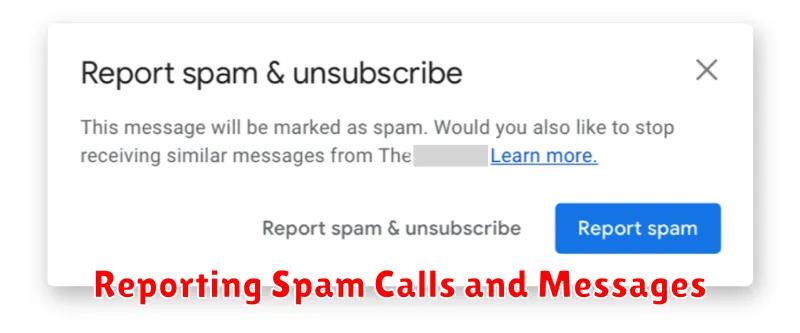
Reporting spam calls and messages helps combat unwanted communications and protect others from falling victim. Reporting these intrusions provides valuable data to carriers and authorities, enabling them to track spam activity and potentially take action against perpetrators.
For wireless carriers, reporting procedures often involve forwarding the spam message or providing call details like the number and time of the call. Check your carrier’s website for specific instructions. Landline providers typically have their own reporting mechanisms, also often found on their websites or through customer service.
You can also report spam texts and calls to the Federal Communications Commission (FCC). They offer an online complaint form and maintain a database of reported spam activity. Reporting to the FCC contributes to their ongoing efforts to regulate and combat these practices.
While reporting may not stop all spam immediately, it plays a crucial role in long-term spam reduction efforts. Your reports contribute to identifying patterns, tracking sources, and ultimately holding spammers accountable.
Advanced Techniques for Spam Protection
For users seeking more robust spam protection, advanced techniques can further minimize unwanted communication.
Leveraging Call Filtering Services
Specialized call filtering services analyze incoming calls against extensive databases of known spam numbers and use sophisticated algorithms to identify potential spam. These services can often block spam calls before they even reach your phone.
Virtual Numbers and Email Aliases
Using virtual numbers for online registrations and email aliases for less crucial communication can create a buffer zone. This prevents your primary contact information from being exposed to potential spam sources.
Regularly Reviewing Privacy Settings
Periodically review the privacy settings on your social media accounts and online platforms. Limiting the visibility of your contact information can reduce the likelihood of it being scraped by spammers.
Exploring Number Blocking Apps with Community-Based Blacklists
Some apps leverage community-based blacklists, allowing users to report spam numbers, creating a dynamic and constantly updated database. This crowdsourced approach can be highly effective in identifying new and evolving spam campaigns.
Best Practices for Avoiding Spam
Minimizing unwanted calls and messages requires proactive measures. One crucial step is to be cautious about sharing your phone number. Avoid posting it publicly on social media or websites.
When filling out online forms, carefully review privacy policies and opt out of marketing communications whenever possible. Legitimate companies will respect your choices.
Be wary of providing your number for contests, surveys, or “free” offers, as these can be sources of spam. If you must participate, use a secondary number or a temporary number service.
Spam Blocking and Privacy Considerations
While blocking spam is crucial, it’s equally important to consider privacy implications. Third-party apps that offer spam blocking often require access to your contacts, call logs, and sometimes even message content. Carefully evaluate the permissions requested by these apps and choose reputable providers with transparent privacy policies.
Consider whether the app’s functionality justifies the level of access it requires. Some apps offer enhanced features like caller ID identification and reverse phone lookup, which may require more extensive permissions. Determine if these features are necessary for your needs or if a simpler blocking solution would suffice.
Built-in spam blocking features on your device often offer a good balance between protection and privacy. These features typically leverage on-device processing, minimizing the need to share data externally. Explore your device’s settings for options like filtering unknown callers or identifying potential spam calls.
